
During your login flow on the tablet, you will be presented with the Review Screen where you will see your available hours for your ON-DUTY NOT DRIVING, DRIVING, and your CYCLE.
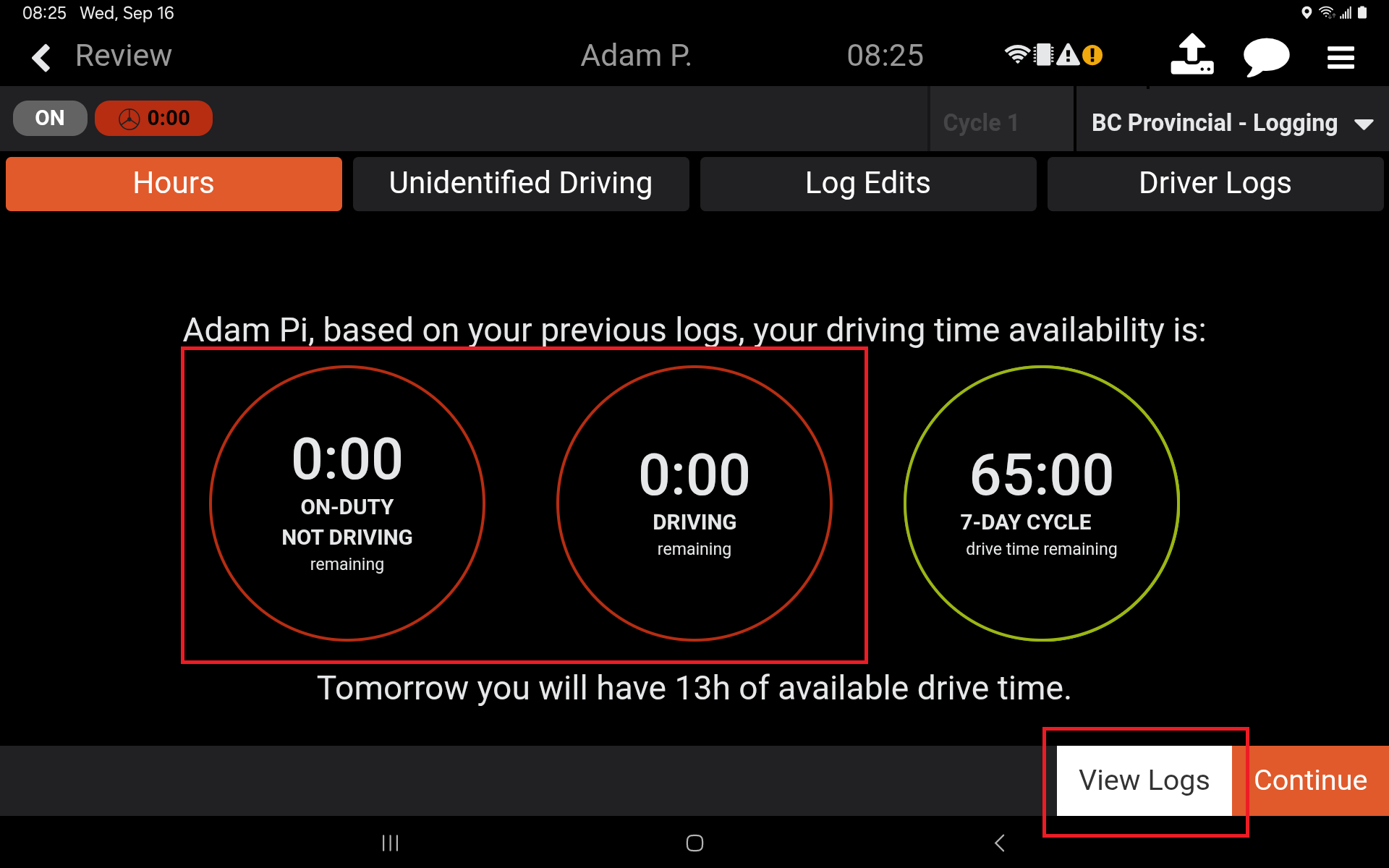
Should you see that you have no available hours, this can indicate one or more of the following reasons:
Reason One:
You have used all of your available hours.
Reason Two:
You are currently in violation of one or more driving regulations.
Reason Three:
You have switched tablets and one or more of those tablets is not connecting to the network. Your current tablet is therefore unable to correctly update your available hours.
If you believe that you should have available hours, click on View Logs. This will take you to your Driver Logs. Here it is recommended that you review your logs for the current cycle. Compare these against the requirements of your driving regulations. The three reasons listed above, and available recourse for each, are elaborated on below.
Reason One
If you have indeed used all of your available hours, take the required time off to reacquire your available hours.
Reason Two
If you are currently in violation of one or more driving regulations, review your logs and regulations to determine how you are in violation. If the violation is a result of:
Your actions, despite correct use of the tablet.
Take the required time off to reacquire your available hours.
Your actions, stemming from incorrect use of the tablet.
Make the appropriate edits to your logs. Incorrect statuses generally stem from:
On-Duty Statuses.
Use the Edit option on the Driver’s log to correct existing duty statuses.
Use the Add New option on the Driver’s log to add a new duty status. Please click HERE for more information on how to add a new Duty Status.
ELD triggered Driving Duty Statuses.
This is a protected duty status. You cannot edit these duty statuses to reclaim hours.
The recourse available is to select the Form button on the Driver Logs screen on each of the affected day’s logs. Scroll to the bottom and add a Comment to explain why the Driving Duty Status is incorrect. Please click HERE for more information on how to add comments to your logs.
If you are currently stuck in a Driving Duty Status, it is important to log in and change your duty status as soon as possible.
If you choose to drive despite showing no available hours, you do so at your own discretion.
Reason Three
If your available hours, as seen at the end of your shift on one tablet, do not match the available hours, as seen at the beginning of a new shift on a different tablet, then one or both tablets may not be connected to the network. If the tablets are not connected to the network, they cannot properly sync your available hours. Please check both tablets for a connection. Reestablish the connections as required, then Restart both tablets so that they can properly sync their data.
Please click HERE for additional information regarding your tablet’s network connections.
If you have any questions regarding why you are seeing zero hours of driving, please contact Navistream Support.
Navistream Support
1(844)571-8200
Ext 2