
If your Navistream camera not powering on, please follow these steps to resolve on.
Please note: If you have just received your Navistream camera please leave it connected to allow it to charge. It may take up to 30-60 minutes for the camera to first power on.
1. Ensure the power connector to the camera is connected. If it is connected, disconnect the connector wait 5-10 seconds and reconnect the connector to the camera.
2. Verify that the camera has been installed into a constant 5V power source inside the fuse box.
3. Inspect both fuses on the power cable and ensure neither fuse has been damaged. Once inspected disconnect and reconnect the power cable from the fuse box.
4. Verify the Ground Wire is still securely fastened to a bolt or screw.
5. Complete a Manual Reboot, to complete follow these steps:
- Open SD Card Cover (please view How Do I Remove and Reinstall the SD Card and SIM Card in my Navistream Camera on how to remove the SD card cover)
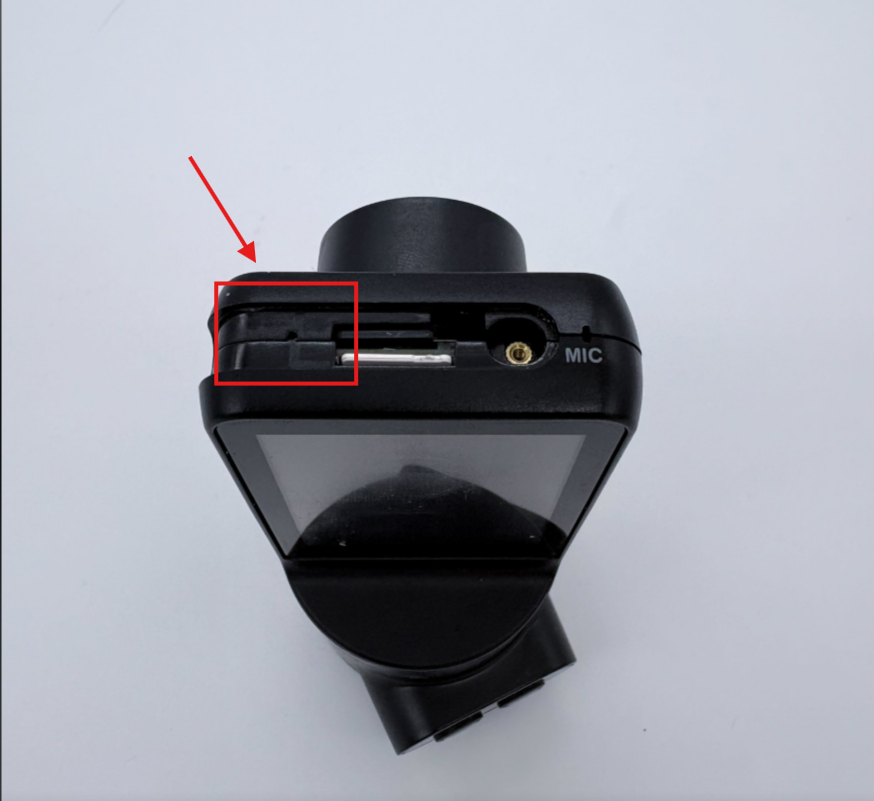
- The reset button will be a small pin hole to the left of the SD card and SIM card. Please see below image for location. You will need a small and thin object such as a paper clip to press this. Press and hold this button until the camera powers off and restarts.
6. If possible attempt another power cable into the vehicle or install the camera into another vehicle. If this is not possible please contact Navistream Support.
If you have followed these steps and your Navistream Camera is still not powering on, please contact Navistream Support.
Navistream Support
1(844)-571-8200 ext 2.